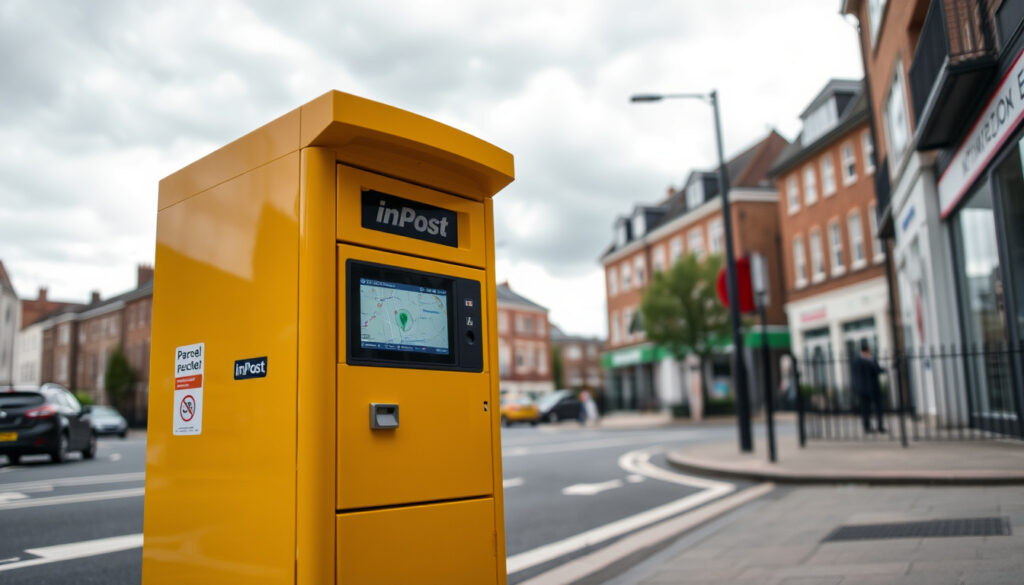
Inpost Locker Near Me – UK Map, Locations and Usage Guide
Finding a convenient parcel locker nearby has become essential for online shoppers and businesses managing deliveries. InPost operates one of the largest automated locker networks in the United Kingdom, offering a flexible alternative to traditional collection points and home deliveries. This guide covers everything you need to know about locating, accessing, and using InPost lockers across the UK.
The InPost network spans thousands of locations, from supermarket car parks to train stations and high street areas. Users can collect, send, and return parcels around the clock without relying on courier schedules or shop opening hours. The system integrates with major retailers including Amazon, eBay, and multiple postal services, making it a versatile solution for modern parcel management.
Whether you need to pick up an online order, return a purchase, or send a package to friends or customers, understanding how the InPost locker network operates helps you make the most of this service. The following sections walk through the practical steps for finding lockers, using them effectively, and troubleshooting common issues.
How Do I Find an InPost Locker Near Me?
Locating the nearest InPost parcel locker involves using the official mobile application or the company website. The app uses your device’s GPS to pinpoint nearby lockers and displays them on an interactive map, along with walking directions and estimated travel time.
Automated parcel lockers available round the clock for pickup and drop-off without time restrictions
Operations across UK, Poland, and France with over 10,000 lockers throughout Europe
Partnerships with Amazon, eBay, Evri, DPD, Royal Mail and other leading delivery services
Mobile application with QR code access, real-time availability checks, and route planning
Using the InPost App for Locker Location
The InPost mobile application, available on both Google Play and Apple App Store, serves as the primary tool for finding and navigating to parcel lockers. Once installed, the app requests location permissions to display nearby lockers on a map interface.
The map view shows colour-coded markers indicating locker availability. Users can filter results by compartment size, with separate options for small, medium, and large parcels. Tapping a locker marker reveals detailed information including exact address, operating status, and real-time space availability across different compartment types.
Route planning functionality integrates with mapping applications on your device. Selecting “Directions” opens Apple Maps or Google Maps with the chosen locker location pre-loaded. This feature proves particularly useful when visiting unfamiliar areas or planning multi-stop journeys that include parcel collection.
Key Insights About InPost Locker Locations
- Strategic placement: Lockers are positioned outside supermarkets, in retail car parks, at transport hubs, and in town centre locations for maximum accessibility
- Real-time availability: The app shows current compartment occupancy, though users report occasional discrepancies between displayed and actual availability
- Print-free option: No label printing required for many services; simply show the QR code from the app at the locker terminal
- Multi-carrier support: Same locker accepts parcels from different delivery services without needing separate accounts
- Alternative locations: If your nearest locker is full, the app suggests nearby alternatives ranked by distance and availability
- Urban concentration: Denser locker coverage exists in larger cities including London, Birmingham, Manchester, and Leeds
- Suburban and rural access: Smaller towns increasingly feature lockers in village centres and retail areas
InPost Locker Facts at a Glance
| Fact | Details |
|---|---|
| Total Lockers | Over 10,000 locations across Europe |
| UK Network | 5,000+ lockers operational |
| Access Method | QR code via app or PIN code sent via SMS/email |
| Compatible Services | Royal Mail, Evri, DPD, Amazon, eBay and others |
| Compartment Sizes | Small (books, documents), medium (clothing), large (multiple items) |
| Operating Hours | 24 hours per day, 7 days per week |
| Cost | Free for collections; sender-paid for drop-offs |
| Remote Locker Opening | Available through the app without touching the locker screen |
What Is an InPost Locker and How Does It Work?
An InPost locker is a self-service automated parcel point consisting of multiple secure compartments of varying sizes. These units replace traditional collection counters and offer an alternative to home delivery or Post Office visits. Each locker installation connects to InPost’s central system, enabling real-time inventory management and secure parcel access.
The system functions as a middleman between delivery companies and recipients. When a courier cannot complete a home delivery, they deposit the parcel in an available locker compartment and notify the recipient. The recipient then visits at their convenience, authenticates themselves, and retrieves their item without needing to interact with any staff member.
The Technology Behind InPost Lockers
Each locker unit contains electronic locks controlled by a central computer system. When a parcel arrives, the delivery driver scans the parcel barcode and selects an appropriate empty compartment. The system automatically generates a unique access code and notifies the recipient through their chosen channel, whether SMS, email, or app notification.
Authentication at the locker uses QR code scanning through the InPost app or manual PIN entry. Users can also employ the app’s remote opening feature, which communicates directly with the locker to unlock the designated compartment without physically interacting with the terminal screen. This proves particularly convenient during adverse weather conditions or when carrying other items.
Enable push notifications in the InPost app to receive immediate alerts when parcels arrive. Early notification helps you collect items before compartments fill up at busy locations.
Why Choose InPost Over Traditional Collection Points?
The primary advantage of InPost lockers lies in their availability outside conventional business hours. Unlike Post Offices and many retail collection points, lockers remain accessible throughout the night, early mornings, and weekends without staff presence. This flexibility suits people with irregular working patterns or those who prefer completing errands outside peak hours.
For online sellers and small businesses, InPost provides a cost-effective shipping solution. The print-free service eliminates the need for label printers, while the 24/7 drop-off capability means parcels can be dispatched without coordinating around courier collection times. Major marketplaces including eBay integrate directly with InPost, streamlining the selling process considerably.
When comparing to home delivery, lockers offer security benefits. Parcels remain locked in secure compartments rather than sitting on doorsteps vulnerable to theft. Additionally, the collection confirmation provides proof of delivery for valuable items, which proves useful for insurance claims or dispute resolution with sellers.
How to Pick Up or Send a Parcel at an InPost Locker?
Collecting a parcel from an InPost locker requires the access code or QR code provided when the item was deposited. The process takes approximately 30 seconds from arrival at the locker to walking away with your parcel.
Step-by-Step Parcel Collection
Upon arriving at the designated locker, open the InPost app and navigate to your active deliveries. Select the parcel you wish to collect and tap the “Open Locker” button. The app communicates with the locker and unlocks your compartment automatically. Alternatively, select “Show Code” to display a QR code or numeric PIN for manual entry at the locker terminal.
If using manual entry, tap the screen on the locker terminal and select “Collect Parcel.” Scan the QR code displayed in your app, or type in the numeric PIN. The system verifies your code against its database and opens the corresponding compartment if everything matches. Retrieve your parcel, ensure the compartment is empty, and close the door before leaving.
Delivery services set different collection windows. Some parcels must be collected within 72 hours before returning to the sender, while others remain for up to 5 days. Check the specific expiry information in your app notification.
Sending a Parcel Through InPost
Sending items via InPost requires first creating a shipping label through the app or partner service. The InPost app supports print-free sending for participating retailers and delivery services. Simply create your shipment, select “InPost Locker” as the drop-off method, and receive a QR code to present at any locker.
Approach the locker terminal and select “Send Parcel.” Scan the QR code displayed in your app. The system identifies an appropriate compartment based on the parcel dimensions you specified when creating the shipment. Place your item in the indicated compartment and confirm the deposit on the terminal screen. The locker closes automatically and notifies the delivery service to collect.
For larger items that exceed locker dimensions, InPost maintains a network of participating retail locations where staff accept oversized parcels. The app filters these locations separately and clearly marks which sites handle large items. Always verify parcel dimensions against compartment limits before attempting a drop-off to avoid failed attempts.
Returning Items Purchased Online
Many retailers offer InPost as a return option at checkout. When initiating a return through the retailer’s portal, select InPost as the return method and keep the generated QR code. Visit any InPost locker, select “Send Parcel,” and scan your return QR code. The system accepts the parcel and arranges collection by the retailer without any additional printing or labelling required.
InPost Locker Hours and Availability
All InPost lockers operate continuously without interruption. The 24/7 availability distinguishes these automated units from most alternatives in the parcel delivery network. No matter when you receive a notification, whether midnight or early morning, the locker remains accessible throughout the year including bank holidays and weekends.
Real-Time Availability Checking
The InPost app displays current compartment occupancy for each locker location. This feature shows how many small, medium, and large compartments remain available, helping you choose a location likely to have space for incoming deliveries or where you can successfully drop off outgoing parcels.
However, user feedback from app store reviews indicates that availability information may not always reflect current conditions. Some customers report arriving at lockers showing available space only to find all compartments occupied. Checking availability shortly before visiting helps reduce the likelihood of wasted trips.
App availability displays may lag behind actual locker status. Technical problems occasionally prevent accurate compartment reporting. If your nearest locker appears full, consider checking the next closest location rather than making multiple trips to the same site.
Peak Usage Times and Busy Locations
Locker availability fluctuates based on location type and surrounding population density. Urban lockers near shopping centres experience high turnover during weekend shopping periods. Lockers at train station car parks fill quickly on weekday mornings as commuters collect overnight deliveries before travelling.
For senders, midday and early afternoon typically offer better availability than early morning or evening hours. Collectors should aim to retrieve parcels promptly upon notification, particularly during holiday seasons when volumes increase substantially and uncollected parcels occupy compartments longer than usual.
InPost App and Customer Support
The InPost application serves as the central hub for managing all parcel activity. Beyond locker finding and navigation, the app handles parcel tracking, return initiation, and communication with sellers or delivery services regarding delivery preferences.
Core App Features
Parcel tracking within the app provides updates from dispatch through to collection confirmation. Notifications alert users when parcels are dispatched, arrive at lockers, are awaiting collection, and when collected successfully. These real-time updates eliminate the need to manually check tracking pages or wait by the door for deliveries.
The remote opening feature deserves particular attention. Instead of walking to the locker terminal and navigating its menu system, standing near the locker with the app open allows immediate compartment access with a single tap. This proves significantly more convenient when weather conditions are poor or when visiting lockers in poorly lit areas.
Route planning integration connects locker locations with standard mapping applications. The app can open directions in Apple Maps or Google Maps depending on your device settings. Walking, driving, and public transport options display estimated journey times, helping you plan collections around other commitments.
Common Issues and Troubleshooting
Several recurring problems affect InPost users based on available customer feedback. Understanding these issues helps you avoid frustration and resolve problems more quickly when they occur.
QR code scanning failures represent a frequent complaint. If the locker terminal fails to read your code, try adjusting screen brightness on your phone, cleaning the camera lens, or holding the phone at a different distance. As a fallback, the numeric PIN option works independently of camera functionality and proves more reliable in challenging conditions.
Compartment selection errors occasionally occur during the sending process. When the system cannot find a suitable compartment for your parcel, it may indicate incorrect dimension information entered during label creation. Verify the measurements and weight before attempting another drop-off. If problems persist, try an alternative locker location or visit a retail partner for assisted drop-off.
Expired collection codes cause parcels to remain locked beyond their intended collection window. If your code has expired, contact the sender or delivery service that initiated the shipment. They can regenerate access codes or arrange alternative delivery methods. The InPost app provides contact options for delivery services, though response times vary by provider.
InPost Locker History and Expansion
Understanding how the InPost network developed provides context for its current capabilities and future direction.
- 2012: InPost established operations in Poland, building the foundation for automated parcel locker infrastructure across Central Europe
- 2020: Strategic expansion into the United Kingdom market, introducing lockers at supermarket car parks and retail locations nationwide
- 2022: Continued UK growth accelerated by partnerships with major e-commerce platforms seeking flexible delivery alternatives
- 2023: UK locker network surpassed 5,000 individual units, establishing InPost as a significant player in the British parcel delivery market
- 2024: Expansion into France alongside continued UK network development, creating a multi-country European presence
- 2025: Mobile application updates introduced enhanced real-time availability features and improved remote opening functionality
The company’s rapid UK expansion reflects growing consumer demand for delivery flexibility beyond traditional Post Office hours. Major retailer adoption, particularly during periods of increased online shopping activity, accelerated network growth beyond initial projections.
What Is Certain and What Remains Unclear
Transparency about what we know and what requires further verification helps readers assess the reliability of information presented here.
| Established Information | Uncertain or Unverified Details |
|---|---|
| 24/7 availability confirmed across all InPost locker locations | Exact UK location count varies across different sources and may have changed since last verification |
| Official app provides GPS-based locker finder with map interface | Specific customer support contact channels require additional verification |
| QR code and PIN authentication methods function as documented | Comprehensive performance statistics across all UK regions unavailable |
| Partnerships with major retailers including Amazon and eBay confirmed | Future expansion plans for specific geographic areas not publicly disclosed |
| Remote locker opening via app available as documented feature | Detailed breakdown of locker distribution by region or postcode sector |
The core functionality of InPost lockers remains well-documented through official sources and user reviews. However, specific metrics regarding coverage density, reliability rates, and expansion timelines involve details that may have changed since initial publication or remain proprietary to the company.
Where to Find Additional Information
Several official and independent sources provide further detail on InPost services and customer experiences. The official InPost app contains the most current information on locker locations and service updates. Retailer websites offering InPost as a delivery option provide specific guidance relevant to their particular return and shipping policies.
UK Government consumer advice regarding parcel delivery rights applies to items sent through InPost lockers. Understanding these protections helps resolve disputes with sellers or delivery services when problems arise. Independent review platforms offer unfiltered customer experiences that complement official information sources.
Consumer rights regarding parcel deliveries remain protected regardless of delivery method chosen at checkout. When using InPost lockers, the original retailer retains responsibility for ensuring goods arrive as described.
— UK Government consumer protection guidance
For technical support or service complaints, contacting the delivery service associated with your particular shipment often proves more effective than general InPost enquiries. Each carrier maintains its own escalation procedures and service level commitments.
Summary
Finding an InPost locker near you involves downloading the official application, enabling location services, and browsing the interactive map. The network offers genuine 24/7 access to parcel collection and drop-off services without the constraints of shop hours or courier scheduling. Integration with major retailers and multiple delivery services creates a versatile system suitable for online shopping, returns, and business shipping.
For those managing deliveries in urban areas, InPost lockers provide particularly strong value given their concentration in high-footfall locations. suburban and rural users should verify nearby availability through the app before relying heavily on the service. Occasional technical issues with availability reporting require flexibility in planning collection trips.
Similar local services exist for different vehicle maintenance needs. Those searching for authorised Hyundai service centres or hobby and model shops in specific regions can find dedicated guides through our related resources.
Frequently Asked Questions
How long do parcels stay in InPost lockers before returning to sender?
Collection windows typically range from 72 hours to 5 days depending on the delivery service. The specific expiry date appears in your collection notification. Expired parcels return to the sender automatically.
Can I change my collection locker location after selecting one?
The delivery service assigns the locker location when dispatching. You cannot change the designated locker, but you can collect from a different InPost location if the sender rebooks delivery to an alternative address.
What happens if my QR code does not work at the locker?
Try adjusting your phone screen brightness or use the numeric PIN instead. If problems persist, contact the delivery service that sent the parcel to request a code regeneration.
Are InPost lockers accessible for people with disabilities?
Locker installations vary by location. Many feature lowered terminal screens and wheelchair-accessible compartments, though not all sites have undergone accessibility modifications.
Can I send parcels internationally using InPost lockers?
InPost lockers currently support domestic UK deliveries within England, Scotland, and Wales. International shipping requires alternative services designed for cross-border logistics.
How do I contact InPost directly about a locker problem?
Direct support channels include the help section within the mobile application. For issues with specific deliveries, contacting the originating delivery service often yields faster resolution than general enquiries.
What size parcels can InPost lockers accommodate?
Compartments accommodate small items like documents and books, medium parcels including clothing, and large parcels for multiple items. Oversized items exceeding locker dimensions require alternative drop-off points.
Do I need the InPost app to collect a parcel?
The app provides the most convenient experience with remote opening features, but you can collect parcels using only the numeric PIN sent via SMS or email without installing anything.
More related posts
 Luke Pasqualino Movies and TV Shows: Full Guide
 Jared Padalecki: Height, Net Worth, Health & Supernatural
 Tatum O’Neal’s Health Journey: Stroke and Recovery
 Bradley Cooper’s Relationships: Gigi Hadid, Family, News
 Romania National Football Team: Table, Players, Qualifiers 2026
 Google Search by Image: How to Reverse Search Pictures
 Chase DeMoor: From Reality TV to Boxing Record & Net Worth
